Integration Overview
Welcome to the Binj Chat Agent integration guide. This document provides a high-level overview of the steps required to integrate the Binj Chat Agent into your application.
Integration Process
Integrating the Binj Chat Agent into your application involves two main steps:
- Backend Integration: Set up your server to communicate with our API
- Frontend Integration: Add the chat widget to your website
Step 1: Backend Integration
The first step is to set up your backend to communicate with the Binj Chat Service API. This involves:
- Obtaining an API key
- Creating a chat session to get a chat ID
- Securely storing and managing chat IDs
Why backend integration first? For security reasons, your API key should never be exposed in client-side code. By implementing the backend integration first, you can create a secure channel for your frontend to obtain chat IDs without exposing sensitive credentials.
Step 2: Frontend Integration
Once you have implemented the backend integration and can obtain chat IDs, you can proceed to integrate the chat widget into your website:
- Add the chat widget script to your HTML
- Configure the widget with the chat ID obtained from your backend
- Customize the appearance and behavior of the widget
Integration Flow
Here's the complete integration flow:
- Your backend requests a new chat session from the Binj API
- The Binj API returns a chat ID
- Your backend stores the chat ID and makes it available to your frontend
- Your frontend initializes the chat widget with the chat ID
- Users interact with the chat widget on your website
Detailed Integration Diagram
The following diagram illustrates the complete integration process, including the initial setup, user interactions, and authentication flow:
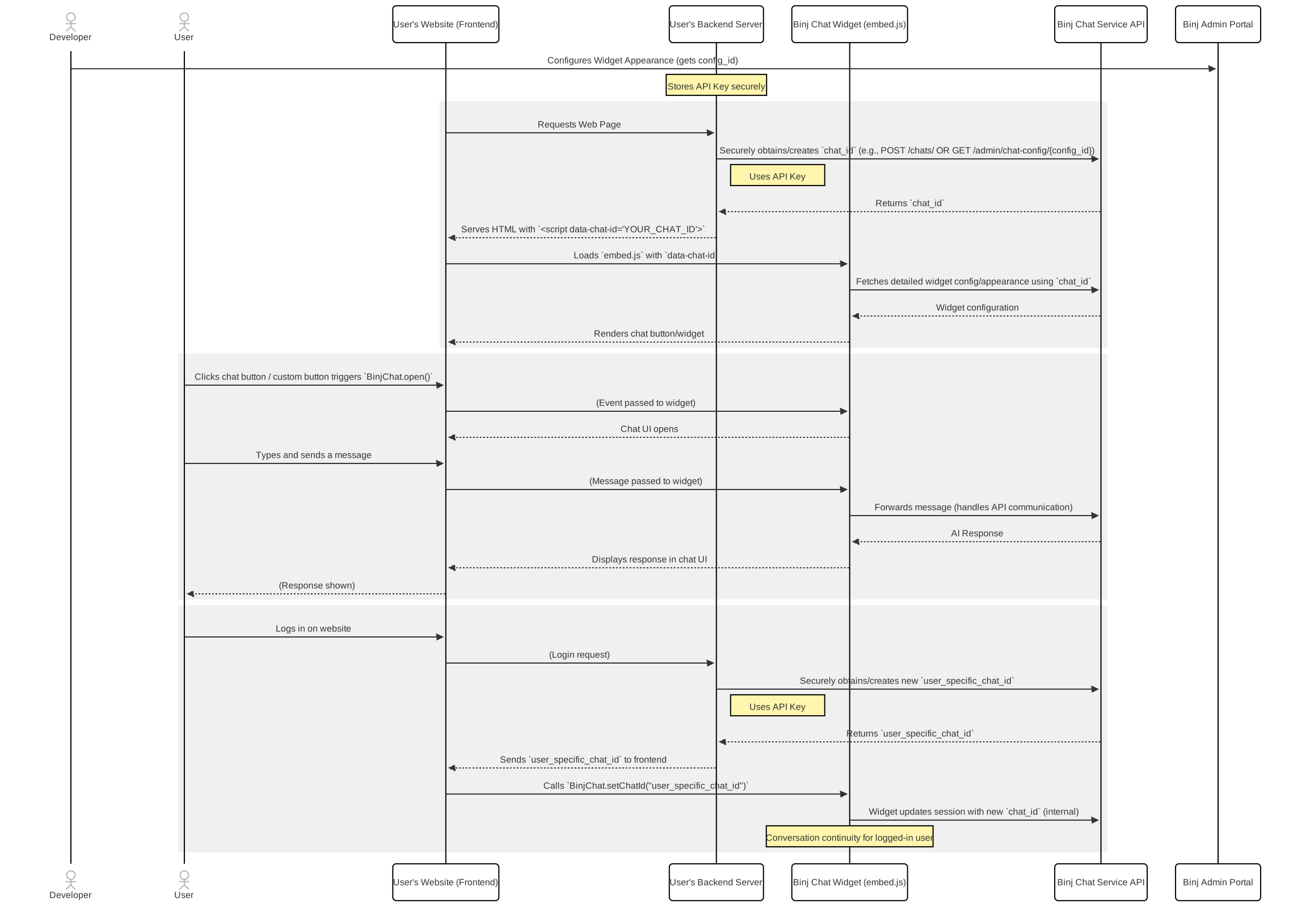
The diagram shows how your website, backend server, and the Binj Chat Service components interact during the integration process.
Next Steps
Ready to get started? Follow these guides in order:
- Backend Integration - Learn how to get a chat ID
- Frontend Integration - Add the chat widget to your website
By following this sequence, you'll ensure a secure and seamless integration of the Binj Chat Agent into your application.